Sort shipping labels by SKU and print a picklist (free)
Print Meesho, Flipkart and Amazon labels in SKU order with a picklist, split the stack by courier for handover, and add packing notes like FRAGILE.


Natium Labs
3 min read ·
Short answer: print your shipping labels sorted by SKU, and pick from a picklist of units per SKU before you pack. The free label cropper does both from Meesho, Flipkart and Amazon label PDFs, and can also split the stack by courier and print a note like FRAGILE on each label.
When a hundred orders come in, packing goes fastest if you pick each product once and pack every parcel that needs it in one go. That takes two things: labels printed in product order, and a list of how many of each product to pick. Here's how to get both from the label PDFs you already download.
Why print order matters
Marketplace label PDFs list orders in the order they were placed. Packed in that order, someone walks back to the same shelf again and again. Sorted by product (SKU), all the labels for one product come out together: pick that product once, in the right quantity, and pack its parcels one after another.
| Print order | Best for |
|---|---|
| As in the files | Small batches, or orders packed as they arrive |
| By SKU | Picking each product once; many orders of few products |
| By courier | Handing parcels over to several couriers at the end of the day |
Sort labels by SKU
- Drop your label PDFs into the label cropper, from one marketplace or several.
- Set Order to By SKU. Labels with the same SKU print one after another; within a SKU they keep their original order.
- Download and print. The thermal printing guide covers printer settings.
The SKU is read from the text printed on each label. A label that shows no SKU as text (some print it only in a barcode) can't be sorted by SKU and keeps its place at the end.
Print a picklist
The cropper adds the labels up into a picklist: each SKU, how many labels have it, and how many units to pack (a label for 2 units counts as 2). Download it as a PDF to print, or as a CSV to open in Excel. Pick from the list first, then pack from the sorted labels.
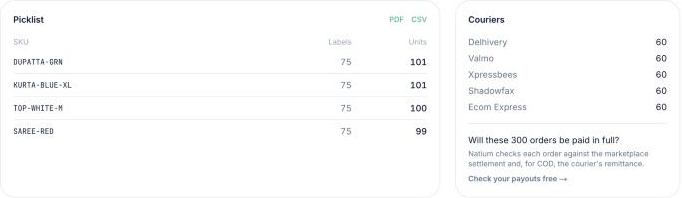
The picklist (units to pick per SKU) and the count of parcels per courier, from the same batch.
Split the stack by courier for handover
At the end of the day, parcels go to more than one courier. Set Order to By courier: each courier's labels print together, and each group starts with a page showing the courier's name and how many labels follow. The stack of parcels splits at those pages, and the counts are there to check against the courier's pickup.
Add a note for the packing table
To flag something while packing, add a note: one for every label (for example FRAGILE), or for a single SKU (for example RED-M for a colour and size that's easy to mix up). It prints in bold along the bottom edge of the sticker, outside the label, so the label and its barcode are never covered.
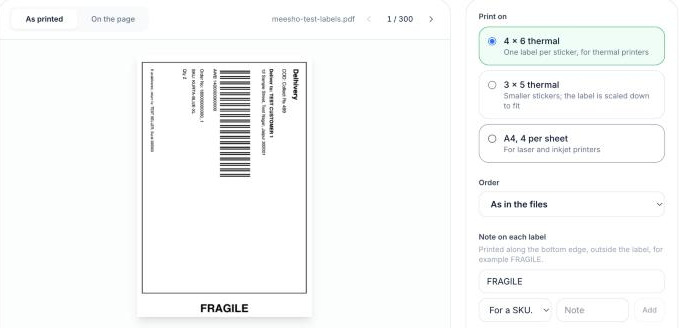
A note prints below the label, never over it.
One check before a big batch
Look at a few labels in the preview and print one before the batch. If the picklist shows labels without a SKU, open one of them: the SKU may be printed in a way the cropper doesn't read yet. To print invoices with the labels, see printing labels and invoices without wasting paper.
Questions sellers ask
What is a picklist?
A list of each product (SKU) in a batch of orders and how many units of it to pick from the shelf before packing.
How do I sort shipping labels by SKU?
Drop the label PDFs into Natium's free label cropper and set Order to By SKU. Labels with the same SKU print together, in their original order within each SKU.
Why are some labels missing a SKU in the picklist?
The SKU is read from the text printed on the label. A label that shows the SKU only in a barcode, or in a layout the cropper does not read yet, keeps its place at the end.
Can I sort labels by courier?
Yes. Set Order to By courier: each courier's labels print together, after a page with the courier's name and the number of labels.
Was this useful?
Written by Natium Labs
Natium checks every marketplace, courier and payment-gateway payout against the orders it came from, and shows you anything that came up short. We write about the fees and rules behind those payouts, with sources.
Responses
No responses yet. Questions from other sellers are welcome.