How to split label and invoice PDFs for 4×6 thermal printers
Three ways to split Meesho, Flipkart and Amazon label and invoice PDFs: 4×6 labels only, each invoice after its label, or invoices separately on A4.


Natium Labs
3 min read · · Updated
Short answer: print labels on 4 × 6 thermal stickers and the invoices separately on A4, or put each invoice right after its label on the same paper. Use Natium's free Meesho, Flipkart, or Amazon label cropper directly in your browser.
Marketplace label PDFs often put the shipping label and the tax invoice on the same A4 page. On a thermal printer you usually want only the label. Sometimes you need the invoice too: for your records, for the customer, or because your marketplace wants it in the parcel. Here are the three ways to print both without wasting paper, and how to choose.
Why the label and invoice come together
The label goes on the outside of the parcel; the invoice is the bill for what's inside. Marketplaces often generate both at once for each order, so the PDF you download can have one order per page with both on it. Whether the invoice must go inside the parcel depends on the marketplace and can change, so check its current seller rules.
Three ways to print, side by side
| Labels only | Invoice after each label | Labels on thermal, invoices on A4 | |
|---|---|---|---|
| Printers | Thermal | Thermal, or one laser/inkjet | Thermal and laser/inkjet |
| Paper | One 4 × 6 sticker per order | Two stickers (or two A4 quarters) per order | One sticker + one A4 page per order |
| Label and invoice stay together | — | Yes, one after the other | Same order in both stacks |
| Good for | No invoice needed | Packing one order at a time | Invoices kept on plain paper |
Option 1: labels only, on thermal stickers
Crop the labels and print them on 4 × 6 thermal stickers. The cropper finds the label on each page and leaves the invoice out. The thermal printing guide covers the printer settings.
Option 2: each invoice right after its label
Tick Print each invoice after its label. The file then goes label, invoice, label, invoice, all on the same paper. On a thermal roll, the sticker after each label carries that order's invoice. On A4, 4 per sheet, each label sits next to its invoice:
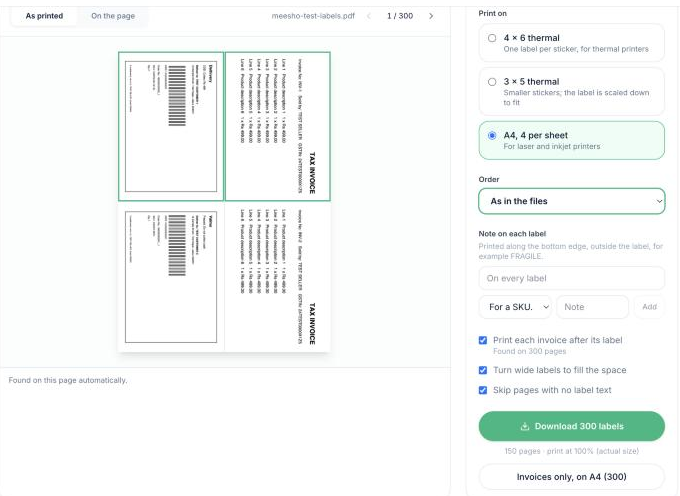
A4, 4 per sheet, with each invoice after its label: one order per half sheet.
Option 3: labels on thermal, invoices on A4
Download the labels for the thermal printer, then choose Invoices only, on A4: one invoice per A4 page, in the same order as the labels, for an ordinary printer. Sort both by SKU or by courier and they stay in step: the second invoice in the stack belongs to the second label on the roll.
Check before you print the batch
- Look at a few pages in the preview. In On the page, the label should be inside the green box and the invoice inside the dashed outline. If a page is cut wrongly, drag the box on that page.
- Print one test label first, and scan the barcode with your phone. Verify that the barcode scans cleanly with your phone camera or Google Lens before running the full batch. If the barcode is cut off or distorted, couriers will reject the parcel at pickup.
- Print at 100% (Actual size). Never use "Fit to printable area", which distorts barcode proportions.
- An invoice comes out cut off on A4? The print dialog may still be set to the thermal label size. Switch the paper size to A4.
Keep invoices useful for your accounts
If you reconcile your payouts, the order numbers on the invoices are what you'll match against the settlement report. Natium checks each order against the marketplace settlement and, for COD, the courier's remittance.
Questions sellers ask
Do I need to put the invoice inside the parcel?
It depends on the marketplace and its current seller rules, which can change. Check the rules in your seller panel.
How do I separate the label from the invoice in the PDF?
Drop the label PDF into Natium's free label cropper. It finds the label and the invoice on each page, and you can print labels only, each invoice after its label, or invoices on their own A4 pages.
Can I print labels on a thermal printer and invoices on A4?
Yes. Download the labels for 4 × 6 stickers, then download the invoices only on A4. Both come out in the same order, so the stacks match.
Why is my invoice cut off when I print it?
The print dialog is probably still set to the label size. Switch the paper size to A4 and print at 100% (Actual size).
Was this useful?
Written by Natium Labs
Natium checks every marketplace, courier and payment-gateway payout against the orders it came from, and shows you anything that came up short. We write about the fees and rules behind those payouts, with sources.
Responses
No responses yet. Questions from other sellers are welcome.