Why is my Meesho label printing small? Fix your 4×6 thermal printer settings
Fix Meesho labels printing small, cut off or blank on 4×6 (100×150 mm) thermal printers. Step-by-step printer settings and free in-browser label cropper.


Natium Labs
4 min read · · Updated
Short answer: crop each label out of the A4 label PDF onto its own 4 × 6 inch (100 × 150 mm) page, then print at 100% / Actual size on 4 × 6 paper with no margins. The free Meesho label cropper does the cropping for hundreds of labels at once, in your browser.
Marketplace label PDFs, Meesho's among them, often come as A4 pages: the shipping label on top, the tax invoice below. A 4 × 6 inch thermal printer can't use a page like that as it is. This guide shows how to turn it into one label per sticker, and the printer settings that stop labels printing small, cut off or blank.
What "cropping" a label means
A 4 × 6 inch label is 100 × 150 mm, a common thermal label size for courier parcels in India. Thermal printers print with heat on a roll of stickers, so there's no ink or toner to buy, but they only print what fits on one sticker. Send them an A4 page and it comes out shrunk, or with only part of it printed.
Cropping cuts each label out of its A4 page and puts it on its own 4 × 6 page, so one page of the file is one sticker on the roll.
Crop your Meesho labels in four steps
- Download the label PDF from your Meesho Supplier Panel as usual. You can download several batches; the cropper takes more than one file at a time.
- Drop the PDFs into the label cropper. Each page is read on your computer, and the label is found on each page by itself: everything printed above the invoice. Nothing is uploaded, which matters because labels carry your customers' names, addresses and phone numbers.
- Check the preview. Flip through a few pages. If a label is cut wrongly, open On the page and drag the box, or its corners, onto it.
- Choose 4 × 6 thermal and download. You get one 4 × 6 page per label, ready to print.
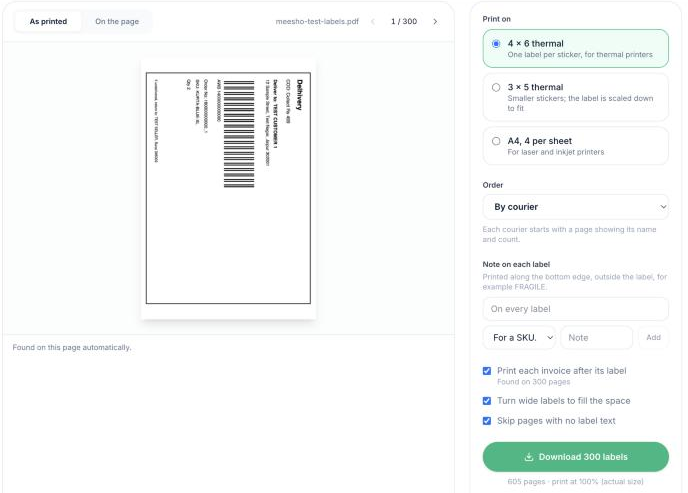
The label cropper with a batch of test labels: the preview shows the label as it will print.
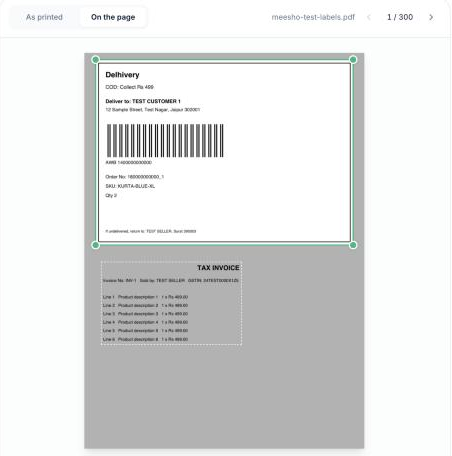
On the page: the green box is the label that prints; the dashed area is the invoice, left out unless you ask for it.
Printer settings that matter
Most printing problems come from the print dialog, not the label file. Set these once, before the first print:
| Setting | Choose | Why |
|---|---|---|
| Paper size | 4 × 6 in (100 × 150 mm), portrait | Matches one sticker on the roll |
| Scale | 100% or Actual size | "Fit to page" shrinks the label |
| Margins | None, or the smallest allowed | Margins push the label off the sticker |
| Pages per sheet | 1 | Each page of the file is one sticker |
Seller Pro-Tip: The 5-second phone scan test. Always print one test label first and scan the barcode with your phone camera or Google Lens before printing the full batch. If the barcode is stretched, compressed or cut off at 4 × 6, courier pickup riders (Delhivery, Ekart, Shadowfax) will reject the parcels at pickup, creating delayed dispatches and heavy packing rework.
Labels still coming out wrong?
| What you see | Likely cause | Fix |
|---|---|---|
| Label printed small, with white space around it | The print dialog is scaling it | Set the scale to 100% / Actual size |
| Part of the label missing | Paper size doesn't match the roll | Set paper size to 4 × 6 in (100 × 150 mm) |
| Every other sticker blank | The printer feeds an extra sticker per page | Calibrate the printer to the roll (see its manual) |
| Barcode looks faint | Print darkness set low | Raise darkness a little in the printer settings |
| Label cut through the barcode | The crop area missed part of the label | Open On the page and drag the box to cover it |
The cropper copies each label as the original vector drawing, not as a picture, so barcodes stay as sharp as they were in the marketplace's file.
No thermal printer? Use A4 sheets
You can print the same labels on an ordinary laser or inkjet printer. Choose A4, 4 per sheet: four labels on each A4 page, with light lines to cut along. That's a quarter of the paper of printing one A4 page per order. If you also need invoices, see printing labels and invoices without wasting paper.
Pack faster while you're at it
The same file can come out sorted by SKU, with a picklist of how many of each product to pick, or grouped by courier for handover. See how to sort labels by SKU and print a picklist.
Questions sellers ask
What size is a 4 × 6 shipping label?
4 × 6 inches is about 100 × 150 mm. It is a common thermal label size for courier parcels in India.
Why does my Meesho label print small on my thermal printer?
The print dialog is scaling the page to fit instead of actual size. In your printer dialog, set Scale to 100% (Actual size), Paper Size to 4 × 6 in (100 × 150 mm), and Margins to None.
Can I crop Meesho labels without uploading them to a third-party server?
Yes. Natium's free label cropper reads and crops the PDF in your browser; the labels, and the customer names, addresses and phone numbers on them, are never uploaded.
Can I print 4 × 6 labels without a thermal printer?
Yes. Print them four to an A4 sheet on an ordinary laser or inkjet printer and cut along the light lines.
Will the barcode still scan after cropping?
The cropper copies each label as the original vector drawing rather than a picture, so the barcode is as sharp as in the downloaded file. Print one label and check it before a big batch.
Was this useful?
Written by Natium Labs
Natium checks every marketplace, courier and payment-gateway payout against the orders it came from, and shows you anything that came up short. We write about the fees and rules behind those payouts, with sources.
Responses
No responses yet. Questions from other sellers are welcome.